

Key Takeaways
- Fiber transmits data as pulses of light through glass strands; cable uses electrical signals over copper-coaxial lines.
- Fiber offers symmetrical upload and download speeds; cable plans typically deliver much faster downloads than uploads.
- Cable networks share neighborhood bandwidth, which can reduce speeds during peak hours; fiber connections are generally less susceptible to congestion.
- Fiber availability is expanding but still limited geographically, while cable reaches the majority of U.S. households.
- Latency - the delay in data travel - is typically lower on fiber, which matters for video calls, gaming, and real-time applications.
Option A
Fiber Internet
The newer, purpose-built broadband technology.
Best for: Households that need symmetrical upload and download speeds, low latency, and consistent performance under heavy use.
Option B
Cable Internet
The widely available, established broadband standard.
Best for: Homes in areas where fiber hasn't been deployed yet, or users who need reliable speeds without waiting for infrastructure upgrades.
If you work from home and rely heavily on video conferencing or uploading large files
Fiber Internet
Symmetrical speeds mean your upload bandwidth matches your download, preventing the bottlenecks that commonly slow video calls and file transfers on cable connections.
If fiber infrastructure hasn't reached your neighborhood yet
Cable Internet
Cable delivers download speeds capable of handling streaming, browsing, and moderate multi-device use, making it a practical choice where fiber isn't an option.
If you live in a densely populated area and experience slowdowns in the evenings
Fiber Internet
Fiber's dedicated connections are less vulnerable to neighborhood congestion, making performance more consistent during high-demand periods.
If you game online or use latency-sensitive applications regularly
Fiber Internet
Fiber's lower and more stable latency reduces lag, which directly improves responsiveness in real-time applications.
If your budget is a primary concern and download speeds above 100 Mbps are sufficient
Cable Internet
Cable plans are widely available at multiple price points and can deliver adequate speeds for most everyday household internet tasks.
How Each Technology Actually Moves Data
The most fundamental difference between fiber and cable internet is the physical medium carrying your data - and that choice shapes everything else about how each connection performs.
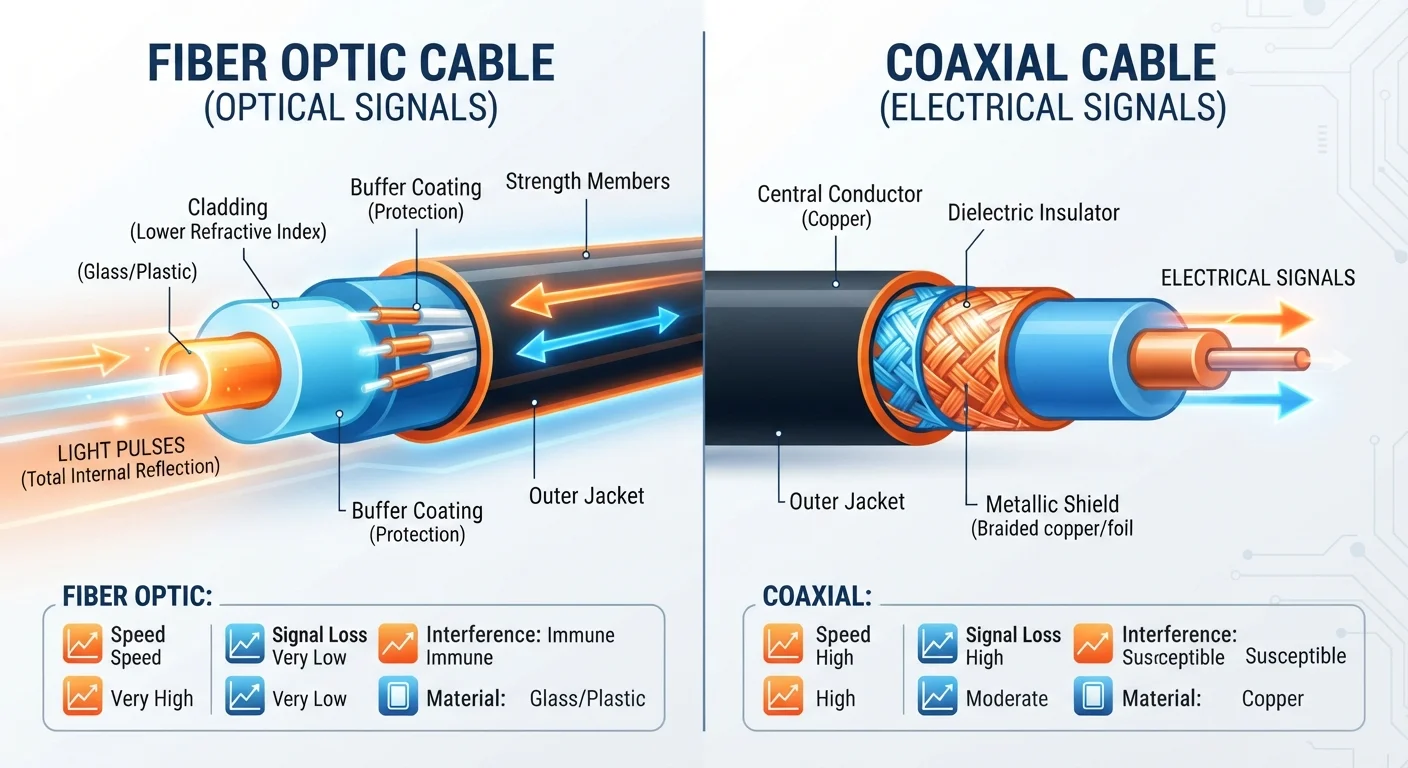
Fiber optic internet transmits data as pulses of light traveling through thin strands of glass or plastic. Because light travels at an extraordinarily high speed and experiences minimal signal degradation over distance, fiber can maintain consistent performance across long cable runs without amplification. The signal is also immune to electromagnetic interference, which can affect copper-based lines.
Cable internet uses coaxial cable - the same type of copper-lined cable historically used to deliver television signals. Data travels as electrical signals, which degrade over distance and are more susceptible to interference. Providers use a technology standard called DOCSIS (Data Over Cable Service Interface Specification) to send internet data alongside or instead of TV signals over this infrastructure. The most current version, DOCSIS 3.1, significantly improved cable's maximum throughput, and DOCSIS 4.0 is in deployment stages as of this writing.
For a broader overview of how these and other connection types fit into the home internet landscape, see Home Internet Explained.
| Criterion | Fiber Internet | Cable Internet |
|---|---|---|
| Transmission medium | Light pulses through glass/plastic strands | Electrical signals over coaxial copper cable |
| Upload vs. download speeds | Symmetrical (equal both directions) | Asymmetrical (download much faster than upload) |
| Typical latency | Lower and more consistent | Moderate; can increase under congestion |
| Susceptibility to congestion | Lower; less shared bandwidth | Higher during peak neighborhood usage |
| Electromagnetic interference | Immune - light-based signal | Susceptible - copper-based signal |
| Geographic availability (U.S.) | Expanding; strongest in urban/suburban areas | Widespread; reaches most U.S. households |
| Infrastructure age | Newer; purpose-built for data | Adapted from legacy TV cable systems |
Speed, Symmetry, and Congestion: Where the Differences Show Up
Raw speed numbers on a plan label don't tell the full story. How those speeds behave in practice - and whether upload matches download - depends on the underlying technology.
Symmetry of speeds is one of fiber's clearest advantages. Fiber plans commonly offer identical upload and download throughput, such as 500 Mbps in both directions. Cable plans, by design, allocate far more capacity to downloads than uploads - a structure that made sense when most users primarily consumed content. Today, that asymmetry creates friction for video calls, cloud backups, remote work, and content creation. To understand why this matters in practical terms, download vs. upload speed breaks it down in detail.
Network congestion is the other key variable. Most cable networks use a shared architecture: multiple homes in a neighborhood draw from the same bandwidth pool. During peak hours - typically evenings - that shared pool fills up, and individual speeds drop. Fiber connections are generally point-to-point or use architectures that are less prone to this neighborhood contention, resulting in more stable speeds throughout the day.
~43%
U.S. homes with access to fiber internet
According to FCC broadband availability data, fiber has been expanding rapidly but still reaches fewer than half of U.S. locations as of recent reporting.
10-20×
Typical cable download-to-upload speed ratio
Many standard cable plans advertise download speeds many times higher than upload speeds, reflecting the asymmetric design of DOCSIS-based networks.
It's also worth noting that advertised speeds rarely reflect what reaches your device. Equipment quality, router placement, and in-home wiring all factor in. Internet plan speed labels explains the gap between marketing numbers and real-world performance.
Availability, Infrastructure, and Practical Considerations
Technical superiority only matters if the technology reaches your address. As of recent Federal Communications Commission mapping efforts, fiber availability has expanded considerably in U.S. urban and suburban markets, but cable infrastructure still covers a substantially larger share of American households. Rural areas often have access to neither, relying instead on DSL, fixed wireless, or satellite options - explored in internet options in rural areas}.
Installation and equipment costs also differ. Fiber typically requires running new cabling to the home, which can involve more extensive installation work in older buildings or properties without existing fiber infrastructure nearby. Cable providers can often activate service using existing coaxial wiring already in the home.
Fiber Isn't Always Faster in Every Plan Tier
While fiber technology supports higher theoretical speeds, the plan you subscribe to determines actual throughput. A low-tier fiber plan may deliver slower speeds than a high-tier cable plan. The advantage of fiber is consistency and symmetry at equivalent tiers, not automatically faster speeds at every price point. Always compare the specific plan specs, not just the technology label.
When comparing plans, look beyond the monthly rate. Equipment rental fees, installation charges, and contract terms contribute meaningfully to the real cost of either service. The true cost of home internet outlines what to account for.
The right choice ultimately depends on what's available at your address, how you use the internet day-to-day, and whether the upload performance or congestion resistance of fiber justifies any additional cost or wait for infrastructure in your area.